
Amenokal: the ESO assistant
Ask anything, or tell it what to do. Amenokal controls your PC, watches over it, sees your screen, and talks with you in Arabic, French or English.
Amenokal is the Tuareg word for the supreme chief: the one who holds command. Included in ESO OS Ultimate from version 3.3, and in the new ESO Standard ISO from 3.5. The HUD arrived in 3.4; holographic panels and the soul in 3.5.
Free for everyone, light on every PC
In Cloud and Auto mode the thinking happens on free big AI models in the ESO cloud, so your PC only sends text and waits: about 60 MB of memory and almost no CPU or GPU, even on old laptops.
Super+J opens Amenokal · Super+Shift+J talks to it
Holographic panels
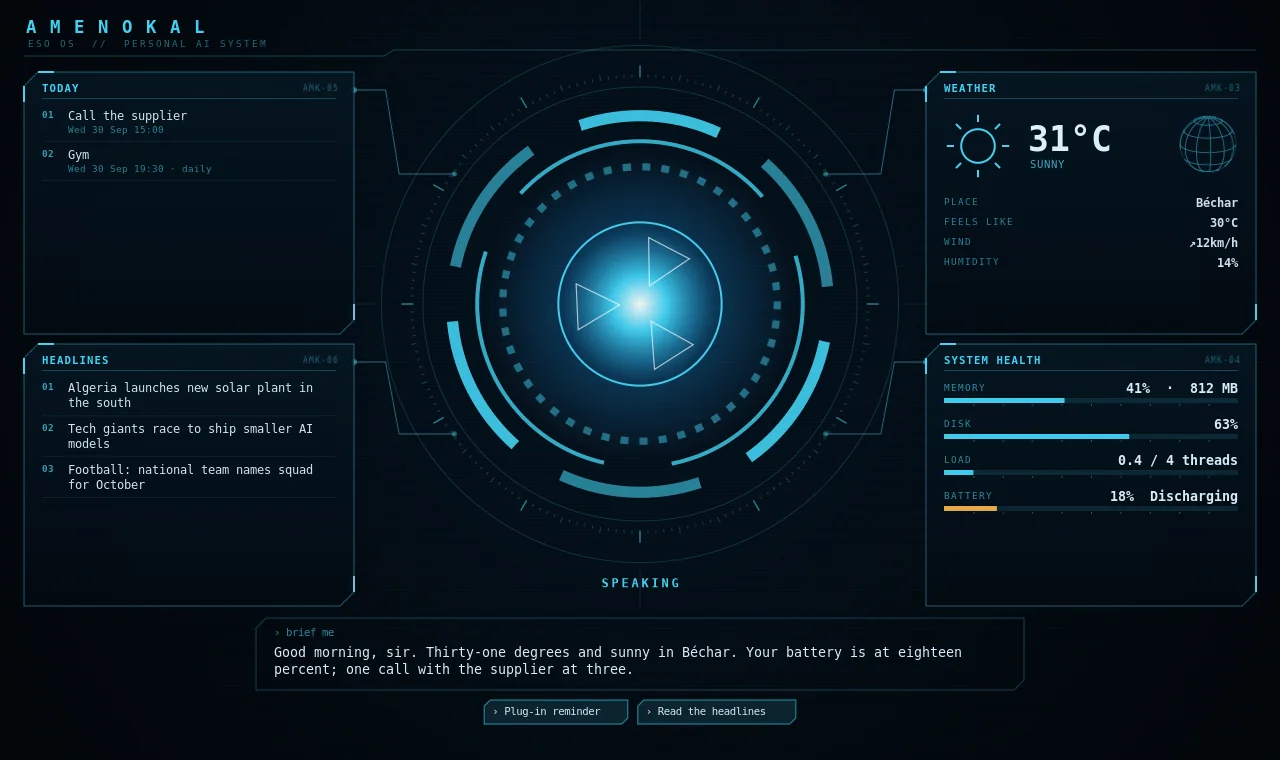
A living interface around a glowing core that pulses with his voice. When he answers, Amenokal opens his own animated panels: the weather with a rotating globe, system health, your day, clickable headlines, what he sees on your screen, protocols as a live checklist, comparisons and plans. With his window closed, alerts and suggestions appear as holograms in the corner of your desktop. Drawn without the GPU, no CPU when hidden.
A real personal AI system
- Sees your screen: "what is this error?" (asks you first)
- Reminders, timers and alarms that ring even after a reboot
- Morning briefing: weather, PC health, today's reminders, updates, headlines
- The Sentinel speaks up by itself: low battery, overheating, memory or disk nearly full, internet lost or back
- Protocols: "focus protocol", "gaming protocol", "night protocol", or create your own
- Controls windows and types for you; smart home through Home Assistant
- A calm British butler voice that runs on your PC, follow-up questions without pressing anything, Esc to interrupt
- Always ready: runs without a window for about 40 MB
A soul: he thinks ahead
- Learns your habits, only on your PC, and offers the app you usually open at this hour
- Your morning briefing, a break after a long session, the night protocol when it gets late
- Warns about a program eating the processor, low battery, a full disk, an app that crashed
- Tells you what happened while you were away, and adapts to your mood
- Never interrupts a full-screen game or film, and stops suggesting what you dismiss
- After each answer, one or two next steps you can click
Three brains, one assistant
- Auto (default): cloud first, and a model on your PC when you are offline
- Cloud: free big models (Llama 3.3 70B, GPT-OSS 120B and more), switching by itself when one is busy
- Local: fully offline with Ollama on your PC, another PC at home, or any Ollama server you run
- Your own free keys (Groq, Gemini, OpenRouter) add your own daily allowance
It does things, not just talk
- Opens apps, files and settings; volume, brightness, music, Wi-Fi
- Explains error messages, reads the system logs, and fixes the cause
- Finds why the PC is slow and what uses the memory
- Searches the web, reads pages, gives the weather
- Asks before changing anything: Allow once, Always allow or Deny
Voice
- Talk: the microphone button or Super+Shift+J; it stops listening when you stop talking
- Understands Arabic, French, English and about 100 more languages
- Answers aloud: a natural cloud voice, or offline speech on the PC
- Optional wake word: say "Amenokal" (offline, off by default)
Grows with you
- Skills: step-by-step know-how it loads when needed, and new skills it learns (with your permission)
- Memory: remembers your preferences, only on your PC
- Plugins and MCP: add new tools, including any Model Context Protocol server
- Its cloud brains improve on the server with no update needed
Privacy
Local mode sends nothing anywhere. In Cloud mode your messages go through the ESO cloud to a free AI model and are not stored; your PC is counted only by an anonymous number for the fair daily limit.